Documentation Index Fetch the complete documentation index at: https://duomi.mintlify.app/llms.txt
Use this file to discover all available pages before exploring further.
Table Blocks Use a table block when the template slide contains a PowerPoint table and your request needs to fill it with row data. The template supplies the table position, width, and default styling. The payload supplies the rows, columns, and any formatting overrides.
Basic Shape Inside slide_data.content.blocks, a table block looks like this:
{ "type" : "table" , "table" : { "table" : { "rows" : [] } } }
The nested table.table.rows field is the actual row data.
Rows and Cells The table data model is row-first. Each item in rows is one PowerPoint table row. Each item in cells is one cell in that row.
{ "rows" : [ { "cells" : [ { "value" : "Column 1" }, { "value" : "Column 2" }, { "value" : "Column 3" } ] } ] }
In code terms:
rows [ 0 ]. cells [ 0 ] // row 0, column 0 rows [ 0 ]. cells [ 1 ] // row 0, column 1 rows [ 0 ]. cells [ 2 ] // row 0, column 2
The generated column count comes from your data. If a header row exists, the number of cells in the header row sets the column count. If there is no header row, the first data row sets it.
{ "rows" : [ { "is_header" : true , "cells" : [ { "value" : "Company" }, { "value" : "Owner" }, { "value" : "Status" } ] }, { "cells" : [ { "value" : "stripe.com" , "is_logo" : true }, { "value" : "Sarah Chen" }, { "value" : "Expansion-ready" } ] } ] }
In this example:
The header row has three cells, so the generated table has three columns.
is_header: true marks the first row as the table header.Data rows can omit is_header; the default is false.
is_logo: true tells the renderer to fetch and place the logo for stripe.com instead of rendering the domain as text.
Cell Values A simple cell uses a string:
{ "value" : "Expansion-ready" }
A logo cell uses a company domain and is_logo: true:
{ "value" : "stripe.com" , "is_logo" : true }
A multi-paragraph cell uses an array. Each object becomes a separate paragraph inside the same table cell:
{ "value" : [ { "text" : "Marcus Johnson" , "format_template" : "expert_name" }, { "text" : "SVP of Customer Success" , "format_template" : "expert_title" } ] }
A bullet list inside one cell uses is_bullet: true. If text is an array, each string becomes one bullet paragraph:
{ "value" : [ { "text" : [ "Renewal owner confirmed budget" , "Expansion proposal sent" , "Security review scheduled" ], "is_bullet" : true , "format_template" : "bullet" } ] }
table_format applies default styling by table region.{ "table_format" : { "default" : { "text" : { "font_name" : "Arial" , "font_size" : 9 , "color" : "#333333" } }, "header_row" : { "text" : { "bold" : true , "color" : "#FFFFFF" }, "cell" : { "background_color" : "#0F766E" } }, "header_column" : { "text" : { "bold" : true }, "cell" : { "background_color" : "#E5E7EB" } }, "header_intersection" : { "text" : { "bold" : true , "color" : "#FFFFFF" }, "cell" : { "background_color" : "#111827" } } } }
Supported text fields include font_name, font_size, bold, italic, color, alignment, and line_spacing.
Supported cell fields include background_color, border_color, and border_width.
Column Configs Use column_configs for column-level behavior.
{ "column_configs" : [ { "column_index" : 0 , "is_header" : true }, { "column_index" : 2 , "format_template" : "risk_score" } ] }
column_index is zero-based. Column 0 is the first column.If is_header is true, that column is treated as a row-header column and can receive table_format.header_column styling.
If format_template is set, that template applies to every non-header cell in the column.
format_templates defines named styles inside the table payload. Reference a template by name from:
column_configs[] to style every non-header cell in a columna cell to style that one cell
a paragraph object inside a cell to style only that paragraph
{ "format_templates" : { "expert_name" : { "text" : { "bold" : true } }, "expert_title" : { "text" : { "italic" : false } } }, "rows" : [ { "cells" : [ { "value" : "salesforce.com" , "is_logo" : true }, { "value" : [ { "text" : "Marcus Johnson" , "format_template" : "expert_name" }, { "text" : "SVP of Customer Success" , "format_template" : "expert_title" } ] }, { "value" : "Advisory Board" } ] } ] }
In this example, Marcus Johnson and SVP of Customer Success are two paragraphs inside the same Contact cell. They are not separate columns.
Conditional Rules Conditional rules are defined inside format_templates. They do nothing until you reference the template from a cell or column.
This example applies conditional formatting to every non-header cell in column 1.
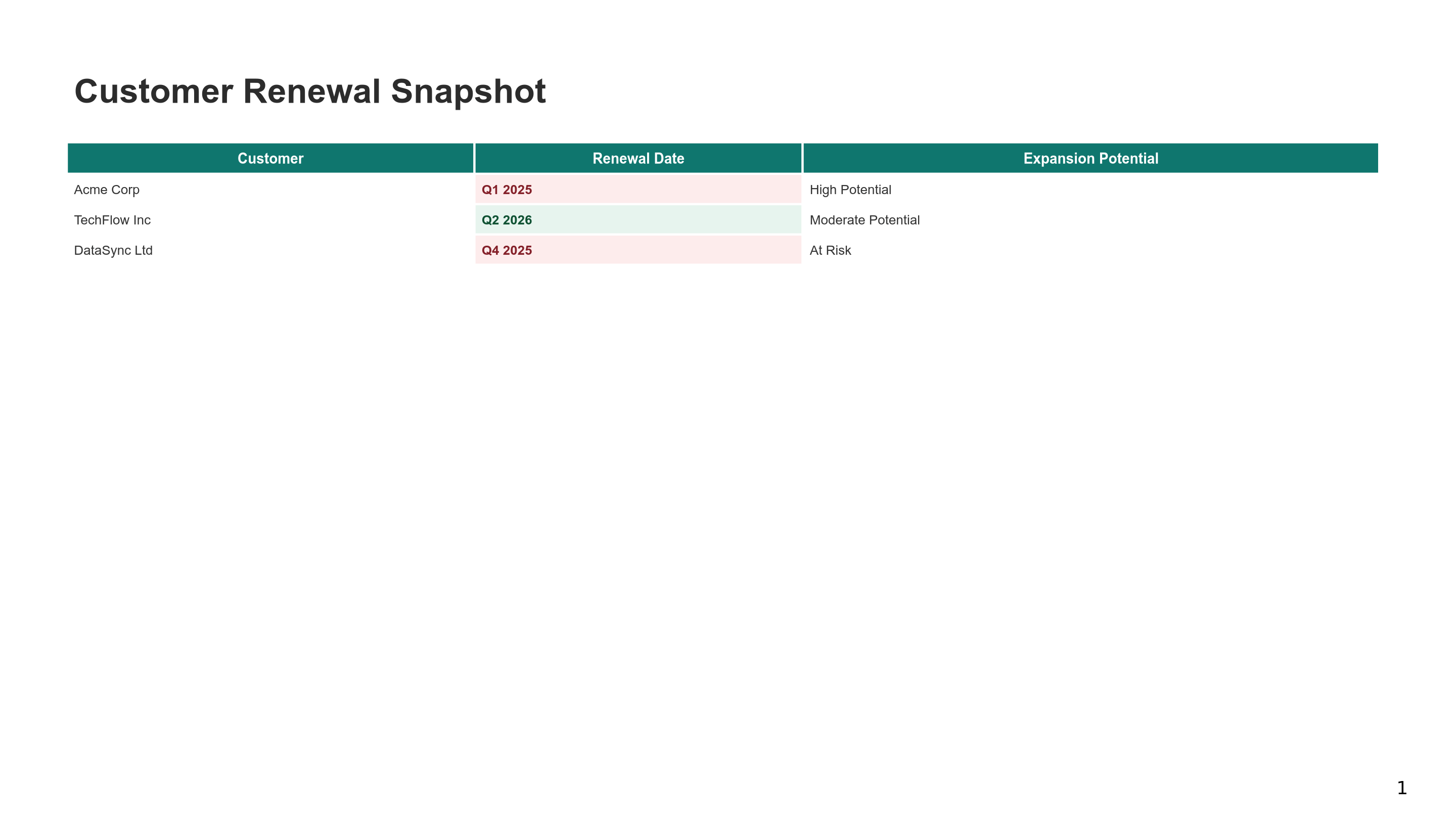
{ "format_templates" : { "date_highlight" : { "rules" : [ { "condition" : { "field" : "value" , "operator" : "contains" , "value" : "2025" }, "text" : { "bold" : true , "color" : "#842029" }, "cell" : { "background_color" : "#FDECEC" } }, { "condition" : { "field" : "value" , "operator" : "contains" , "value" : "2026" }, "text" : { "bold" : true , "color" : "#0F5132" }, "cell" : { "background_color" : "#E7F4EE" } } ] } }, "column_configs" : [ { "column_index" : 1 , "format_template" : "date_highlight" } ] }
Supported conditional operators are equals, not_equals, contains, not_contains, greater_than, less_than, greater_than_or_equal, and less_than_or_equal.
Set auto_paginate_tables: true to let overflowing rows continue onto additional slides for table-only layouts.
{ "options" : { "auto_paginate_tables" : true , "table_min_font_size" : 8 } }
When pagination creates continuation slides, the header row repeats so every generated slide keeps the same column labels.
Pagination does not apply to slides that combine a table with text or use a two-column layout. For those slides, set auto_paginate_tables: false and let the renderer fit the content on one slide.
Visual Example The visual example below is generated from this exact slide_data payload.
Full payload used for the screenshot
{ "title" : "Customer Renewal Snapshot" , "content" : { "blocks" : [ { "type" : "table" , "table" : { "table" : { "table_format" : { "default" : { "text" : { "font_name" : "Arial" , "font_size" : 9 , "color" : "#333333" } }, "header_row" : { "text" : { "bold" : true , "color" : "#FFFFFF" }, "cell" : { "background_color" : "#0F766E" } } }, "format_templates" : { "date_highlight" : { "rules" : [ { "condition" : { "field" : "value" , "operator" : "contains" , "value" : "2025" }, "text" : { "bold" : true , "color" : "#842029" }, "cell" : { "background_color" : "#FDECEC" } }, { "condition" : { "field" : "value" , "operator" : "contains" , "value" : "2026" }, "text" : { "bold" : true , "color" : "#0F5132" }, "cell" : { "background_color" : "#E7F4EE" } } ] } }, "column_configs" : [ { "column_index" : 1 , "format_template" : "date_highlight" } ], "rows" : [ { "is_header" : true , "cells" : [ { "value" : "Customer" }, { "value" : "Renewal Date" }, { "value" : "Expansion Potential" } ] }, { "cells" : [ { "value" : "Acme Corp" }, { "value" : "Q1 2025" }, { "value" : "High Potential" } ] }, { "cells" : [ { "value" : "TechFlow Inc" }, { "value" : "Q2 2026" }, { "value" : "Moderate Potential" } ] }, { "cells" : [ { "value" : "DataSync Ltd" }, { "value" : "Q4 2025" }, { "value" : "At Risk" } ] } ] } } } ] } }
Presentation Generation Generate one slide or a full deck.
Chart Blocks Author bar and column charts.
Text Blocks Author slide text and text sections.